
WITH is now one of my favorite keywords in SQL.
That’s the keyword that lets us use modular design with SQL and also helps us avoid redundant logic in SQL statements.
The WITH clause (first introduced in Oracle Database 9i, also called “subquery factoring” and “common table expression”), to quote Tim Hall of ORACLE-BASE, “may be processed as an inline view or resolved as a temporary table. The advantage of the latter is that repeated references to the subquery may be more efficient as the data is easily retrieved from the temporary table, rather than being requeried by each reference.”
And even more exciting (to PL/SQL fanatics like myself), Oracle Database 12c added the WITH function and WITH procedure variations, allowing you to define PL/SQL subprograms right inside a DML statement. There are two primary reasons to do this:
- Reduce the cost of context switching from SQL to PL/SQL.
- Avoid the repetition of logic in your SQL statement that can be expressed in PL/SQL.
I offer a couple of links below to make it easy for you to learn so much more about this feature. I’d like to focus in this post on a refactoring I just completed on a long SQL statement, leveraging both forms of the WITH clause. It was fun, and I learned a few lessons I thought I’d pass on to you.
with cte_users as (
    select
    dept_id,
    case when exists (
                        select 1
                        from
                            user_departments ud,
                            user_roles ur,
                            app_roles ar
                        where
                            ud.department_id = parent_dept_id and
                            ud.ur_id = ur.ur_id and
                            ur.role_id = ar.role_id and
                            role_code='CODE1' and
                            app_id=:APP_ID)
        then 'fa-check-circle'
        else 'fa fa-times-circle'
    end approver,
    case when exists (
                        select 1
                        from
                            user_departments ud,
                            user_roles ur,
                            app_roles ar
                        where
                            ud.department_id = parent_dept_id and
                            ud.ur_id = ur.ur_id and
                            ur.role_id = ar.role_id and
                            role_code='CODE2' and
                            app_id=:APP_ID)
        then 'fa-check-circle'
        else 'fa fa-times-circle'
    end adm,
    case when exists (
                        select 1
                        from
                            user_departments ud,
                            user_roles ur,
                            app_roles ar
                        where
                            ud.department_id = parent_dept_id and
                            ud.ur_id = ur.ur_id and
                            ur.role_id = ar.role_id and
                            role_code='CODE3' and
                            app_id=:APP_ID)
        then 'fa-check-circle'
        else 'fa fa-times-circle'
    end hr,
    case when exists (
                        select 1
                        from
                            user_departments ud,
                            user_roles ur,
                            app_roles ar
                        where
                            ud.department_id = dept_id and
                            ud.ur_id = ur.ur_id and
                            ur.role_id = ar.role_id and
                            role_code='CODE4' and
                            app_id=:APP_ID)
        then 'fa-check-circle'
        else 'fa fa-times-circle'
    end s_approver,
    case when exists (
                        select 1
                        from
                            user_departments ud,
                            user_roles ur,
                            app_roles ar
                        where
                            ud.department_id = dept_id and
                            ud.ur_id = ur.ur_id and
                            ur.role_id = ar.role_id and
                            role_code='CODE5' and
                            app_id=:APP_ID)
        then 'fa-check-circle'
        else 'fa fa-times-circle'
    end s_adm,
    case when exists (
                        select 1
                        from
                            user_departments ud,
                            user_roles ur,
                            app_roles ar
                        where
                            ud.department_id = dept_id and
                            ud.ur_id = ur.ur_id and
                            ur.role_id = ar.role_id and
                            role_code='CODE6' and
                            app_id=:APP_ID)
        then 'fa-check-circle'
        else 'fa fa-times-circle'
    end s_hr
   from all_departments
)
select
    dept_desc department,
    b.adm Admins,
    b.approver Approvers,
    b.hr HR,
    b.s_approver S_Approvers,
    b.s_adm S_Admins,
    b.s_hr S_HR,
    DECODE(NVL(b.adm, 'fa fa-times-circle'), 'fa-check-circle', 'green', 'red') adm_color,
    DECODE(NVL(b.approver, 'fa fa-times-circle'), 'fa-check-circle', 'green', 'red') approver_color,
    DECODE(NVL(b.hr, 'fa fa-times-circle'), 'fa-check-circle', 'green', 'red') hr_color,
    DECODE(NVL(b.s_adm, 'fa fa-times-circle'), 'fa-check-circle', 'green', 'red') s_adm_color,
    DECODE(NVL(b.s_approver, 'fa fa-times-circle'), 'fa-check-circle', 'green', 'red') s_approver_color,
    DECODE(NVL(b.s_hr, 'fa fa-times-circle'), 'fa-check-circle', 'green', 'red') s_hr_color
from
    all_departments v,
    cte_users b
where b.dept_id = v.dept_id
Anything catch your eye? 🙂
I know what catches my eye: repetition. As in the repeats of those case expressions and the six lines of decode.
Oh, and also: the six lines of decode, not in terms of repetition but in terms of decode. I don’t believe in decode anymore. Not now that we’ve got case.
The first thing I decided to do was reduce the code redundancy in the case expression. My first pass moved the four-way join query in each case expression out to its subquery:
with
cte_role_check as (
   select role_code
     from user_departments ud,
          user_roles ur,
          app_roles ar
    where ud.ur_id = ur.ur_id
      and ur.role_id = ar.role_id
      and app_id = :APP_ID),
cte_users as (
   select dept_id,
          case
          when exists (
                       select 1
                         from cte_role_check
                        where role_code = 'CODE1'
                    ) then
                'fa-check-circle'
          else
                'fa fa-times-circle'
          end approver,
          ...
That certainly cut down on the code within each case expression, but there was still quite a lot there. Then I thought to myself: the case expression returns a value. Like a function. How about if I move all that logic into a function right inside the query?
Which changed the entire WITH clause in the original query into the following (note: I had to pass in :APP_ID to the function because it turns out you cannot reference a placeholder inside a function declared inside the query):
with
   function set_circle (
      p_app_id in varchar2, p_role_code in varchar2) return varchar2
   is
      l_dummy integer;
   begin
      select 1
        into l_dummy
        from user_departments ud,
             user_roles ur,
             app_roles ar
       where ud.ur_id = ur.ur_id
         and ur.role_id = ar.role_id
         and ar.role_code = p_role_code
         and hap.app_id = p_app_id;

      return 'fa-check-circle';
   exception
      when no_data_found then
         return 'fa fa-times-circle';
   end;

   cte_users as (
      select dept_id,
             set_circle(:APP_ID, 'CODE1') approver,
             set_circle(:APP_ID, 'CODE2') adm,
             set_circle(:APP_ID, 'CODE3') hr,
             set_circle(:APP_ID, 'CODE4') s_approver,
             set_circle(:APP_ID, 'CODE5') s_adm,
             set_circle(:APP_ID, 'CODE6') s_hr
        from all_departments
   )
Oh, I like that! Now, time to take a look at the decodes. I could simply switch it to using case, but there would still be a lot of repetition within each case expression. I think it’s time for another with!
with
   function set_color (p_value in varchar2) return varchar2
   is
   begin
      return
         case NVL(p_value, 'fa fa-times-circle')
            when 'fa-check-circle' then
               'green'
            else 'red'
         end;
   end;
Which then leads to a refactored, much more concise, and utterly transformed query:
with
   function set_color (p_value in varchar2) return varchar2
   is
   begin
      return
         case NVL(p_value, 'fa fa-times-circle')
            when 'fa-check-circle' then
               'green'
            else 'red'
         end;
   end;

   function set_circle (
      p_app_id     in  varchar2,
      p_role_code  in  varchar2
   ) return varchar2
   is
      l_dummy integer;
   begin
      select 1
        into l_dummy
        from user_departments ud,
             app_roles ur,
             app_roles ar
       where ud.ur_id = ur.ur_id
         and ur.role_id = ar.role_id
         and hap.app_id = p_app_id;

      return 'fa-check-circle';
   exception
      when no_data_found then
         return 'fa fa-times-circle';
   end;

   cte_users as (
      select dept_id,
             set_circle(:APP_ID, 'CODE1') approver,
             set_circle(:APP_ID, 'CODE2') adm,
             set_circle(:APP_ID, 'CODE3') hr,
             set_circle(:APP_ID, 'CODE4') s_approver,
             set_circle(:APP_ID, 'CODE5') s_adm,
             set_circle(:APP_ID, 'CODE6') s_hr
        from all_departments
   )
select dept_desc department,
       b.adm Admins,
       b.approver Approvers,
       b.hr HR,
       b.s_approver S_Approvers,
       b.s_adm S_Admins,
       b.s_hr S_HR,
       set_color(b.adm) adm_color,
       set_color(b.approver) approver_color,
       set_color(b.hr) hr_color,
       set_color(b.s_adm) s_adm_color,
       set_color(b.s_approver) s_approver_color,
       set_color(b.s_hr) s_hr_color
  from all_departments v,
       cte_users b
 where b.dept_id = v.dept_id
But then….but then…I put this query into my interactive report and tried to run it. All I saw on the screen was…
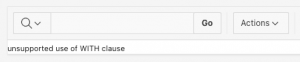
“unsupported use of WITH clause”? Nooooooooo! How can this be? APEX is so tightly integrated with SQL and PL/SQL and the database and…
Well, it is not an APEX issue, folks. It’s the way this feature works. See, if you want to use the WITH clause either in a non-query DML statement (insert, update, delete, merge) or in a sub-query of a select statement, then you have to include the with_plsql hint, as in this example from Connor McDonald’s post (see “Further exploration” below):
SQL> insert /*+ WITH_PLSQL */ into TARGET_TABLE
  2  WITH
  3    function my_initcap(p_string varchar2)
  4                return varchar2 is
  5      l_string varchar2(1000) := p_string;
  6    begin
          ...
 20    end;
 21  select my_initcap(surname)
 22  from   names;
 23  /
You might be thinking: but the WITH clause is already at the top of the select, not in a sub-query. So what’s the problem? The “problem” is that the query you write for an interactive report is not the query that is executed when the interactive report runs. APEX has a very smart report engine that transforms your query into something that can be used to provide all the wonderful features of an interactive report.
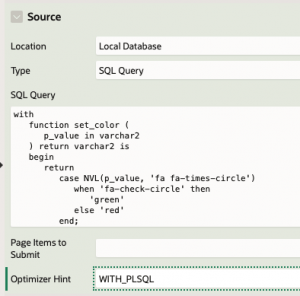
That’s why we get the “unsupported use” error. How do we fix it? APEX to the rescue! When you define a report, you can also provide an optimizer hint right in the properties for that report. This hint (or hints) will then be applied by APEX to the top level of the generated query, and then the report will work fine!
Summing it all up
Here are my take-aways from my “fun with WITH” this week:
- Use the WITH clause to make your SQL more readable and concise.
- WITH function still involves a context switch, though the overhead is reduced compared to a “normal” function stored in the database. So be careful how you use the function. It has the most impact when executed in the where clause.
- You can’t put references to APEX placeholders inside the functions.
- You need to add the WITH_PLSQL hint to your APEX reports.
- You cannot use the WITH clause with queries executed inside a PL/SQL block.
Further exploration
Oracle documentation on WITH clause: https://docs.oracle.com/en/database/oracle/oracle-database/21/sqlrf/SELECT.html#GUID-CFA006CA-6FF1-4972-821E-6996142A51C6
Oracle-Base.com on WITH clause: https://oracle-base.com/articles/misc/with-clause#subquery-factoring
With and without WITH_PLSQL within a WITH SQL statement by Connor McDonald: https://connor-mcdonald.com/2019/05/31/with-and-without-with_plsql-within-a-with-sql-statement/
